Even though the tool is completely open source now and you have full access to the entire code, I see you decided to skip it entirely and never look inside:) I actually built this map editor entirely from scratch by hand in Java.
If you’re curious about how the map matrix handles asset rendering or how the live statistics filters are written, or even how I applied the state design pattern, I’d be happy to talk code architecture with you.
Bruh I can't take seriously someone who comments "literally me" to "Gay Pong" games. X_X
I know this is ragebait at this point :)) Because you did not try the tool, you have the whole code to look at cuz' it's open source, and yet you're still screaming AI left and right, even though it is 'fake news' and a blatant lie,
Hey, this is great stuff, thanks so much for taking the time to create it. I gave it a try and it looks and feels good, but one of the first things I noticed is the inability to move objects. You can add or erase them, but I could not find a move/ relocate option. Am I missing something obvious ?
You can in fact move the objects and NPCs too, all you need to do is hold the Left Click and move them around / relocate them.
BUT there are 2 things to keep in mind: 1. if you want to move an object, you need to have an object (any object) selected, that means to be in the mode: "place object mode". And if you want to move an NPC, you need to have an NPC selected, that means to be in the "place NPC mode"
2. you need to hold the placing position for the object (that is the top left corner of the texture object). That is the exact same position you need to click to remove when deleting an object. That way is easier to understand
I hope it helps and you are able to move the items around now! :D
Thank you, moving the objects around the map worked in the end, but only in "Erase object mode". Pressing CTRL + left click in "Place object mode" will highlight the tiles in a purple colour, but no idea what that does.
It does indeed also work in "erase mode" to move objects, but it should let you move them in "Place object mode" too, in the exact same way, just drag the top-left tile of the object around the map and you should be able to move it too. But keep in mind that you need to be in "object" mode to move objects and in "NPC" mode to move NPCs.
The other thing, it is definetly "Place NPC Walk Area Mode". Are you sure you did not hit "W" button by mistake ? That opens that mode where you can set a path for NPCs to walk if you need that kind of implementation in your game. ( I added it because I actually use that for my game). For me it does not work -Pressing CTRL + left click in "Place object mode"- and that s why i think it s W pressed and opened "Place NPC Walk Area Mode" maybe.
But i would like to hear more, if this was not the case and it is indeed a bug on my end. I want to reproduce it to debug the issue and fix it.
Second issue: after I select a ground cover and I run „Fill Entire Map” or „Fill Empty Tiles” nothing happens, although there is a message saying „Map Filled...”
This is indeed strange, because in my case it always works. I have a question now, because I see the UI looks a little bit different. What OS are you using the tool on ? And if you have some time to chat more, maybe you can write me on reddit or facebook to learn more about this issue
I am using Windows 10 Pro. Probably the most convenient way of connecting would be Discord. Here's my id: aeon3000. Alternatively, my reddit id is ContestLonely7524. Cu facebook-ul e mai complicat :D
Yes, thanks for having a call on Discord with me to clarify those things!:D
The conclusion was that the problems happened because of the "tile size" set, they have to match the size of the tile used (by default the textures TikeMaker DOT comes with are 200x200 px, so "tile size" should be 200 until the users switch the textures with their own)
It was nice talking to you, and good luck with your game in RPG Maker!:D
Thanks a lot, i m glad you enjoy it!:D To be honest, the thought of porting it to Android crossed my mind at some point, but it's not as easy as I had hoped initially. I am not saying no at this point, but it's not as easy as I had hoped. But I am glad you enjoy TileMaker DOT and I hope it will serve you well and you will make many great games with it <3
I just checked to see how Construct 3 works and how it can import maps and it seems that it supports native .tmx/.tsx format import and that is good because in theory the answer would be yes, you could import maps from TileMaker DOT inside Construct 3.
But there is a problem, apparently Construct 3 only lets you import a single texture (spreadsheet) to use for your entire map.. and that is a problem because in TileMaker DOT, how it works is that you have a separate texture (png) for every object in the map, and that means that Construct 3 should be able to read all those separate textures and apparently it does not let you do that, unlike Unity and Godot for example. In this case, it seems to be a limitation of Construct 3:(
But maybe there are multiple versions of Construct and i just did not check the right one (i tried with the online launcher), I suggest you to try and export in tmx/tsx format from TileMaker DOT (from the File menu) and see if you can load that output inside your project in Construct 3, hopefully I am wrong and it can actually import multiple asset images.
I just saw your comment, I tested it on some Linux versions via VM and it worked for me but.. I think I know what the problem is. My personal PC is on windows and I created the TileMakerDOT_Linux_Launcher.sh file on windows and I see it 's using CR LF type endings (so basically it ends lines with /r/n) and probably Debian is using LF endings (just /n).
So when Debian reads the very first line (#!/bin/bash), it sees the invisible Windows character and reads it as #!/bin/bash\r. Because a program named bash\r doesn't exist on their computer, Debian panics and throws a misleading No such file or directory error.
In conclusion, I just edited the .sh file and changed what I explained above and it should work now, hopefully.. please give it a try :D
Just wanted to drop a quick note here to let you know about the latest update I just pushed. I’ve decided to make TileMaker DOT 100% free for everyone to use. My goal is to help other indie devs get their projects moving, so I wanted to remove any barriers and just give you the full toolset.
In this update, I've added a Dark Mode and a much cleaner Modern UI to make the workflow smoother. I also spent some time squashing bugs to make sure everything runs a bit more solid.
You can grab the full update now in the download section. If you’re finding the tool useful, please consider leaving a rating, it’s a huge help for the project's visibility!
If you run into any issues or have ideas for features you'd like to see next, feel free to reply here.
Currently, TileMaker DOT exports maps using external tileset references to keep files organized. For the Unreal integration plugin, you usually just need to ensure your assets folder is in the same relative location as your exported files.
Edited note*:
Sorry, if the plugin works with Tiled, then it should work with this tool. Try this before everything else: When starting the app, leave only "assets" in the base path. And after you finish your project, make sure you copy thee assets folder where you will paste your tmx and tsx files in Unity. In this way you make sure it's a relative path to the folder.
I also mentioned this in the README file: ~~~~~~~~~~~~~~~~~~~~~~~~~~~~~~~~~~~~~~~~~~~~~~~
> **⚠️ Important Path Note:** The path you enter or browse for in the **"Asset Base Path"** field at startup determines your export behavior:
> * **Relative Path:** If you keep it as `assets` (or a relative subfolder), the exported `.tmx` and `.tsx` files will use relative paths. This is recommended for moving projects between different computers or sharing with a team.
> * **Absolute Path:** If you use the "Browse" button to select a full path (e.g., `C:\Users\Name\Desktop\assets`), the exported files will hardcode that absolute path.
~~~~~~~~~~~~~~~~~~~~~~~~~~~~~~~~~~~~~~~~~~~~~~~
Please make sure to read the README, you will find useful tips there:)
And if this does not work, then try the following:
There could be a quick fix for this: Open the exported .tmx in the Tiled Editor.
Then go to the Tilesets panel, click 'Embed Tileset', and save. This will bundle everything into one file that the Unreal plugin should read perfectly! (I think, but it's worth a try)
But could you give me more details about how an embedded tileset should look like? Because honestly I do not know as of now.
But if it is important to you and if I understand how it works, I will be looking into adding a 'Direct Embed' toggle for future updates to make the Unreal pipeline possible.
Thanks for the feedback! And I am waiting for your reply
Thank you so much! That really means a lot. My goal is to make the tedious parts of level design a bit more fun for everyone, so I’m glad the mission resonates with you. As long as I know that my tool is used by other people in their personal or professional projects, I would call this a success on my end.
I truly believe we build better games when we share better tools. If you ever have ideas on how I can make TileMaker DOT even more useful for your workflow, please let me know!
Hey there! Currently you can import only individual textures. I did this because in this way you can make sure to define your own unique IDs for every texture and you will not be conditioned by the randomizig IDs set in a spritesheet for each tile.
I decided to do it this way because it was the easiest to work with in the end product for me and maybe for other people too. At my end I import each object individually having unique IDs.
To be honest here, I had plans to think of a way to import .png spritesheets while also defining IDs for them, but I have a few other more important features in mind like duplicating chunks of map / exporting and importing them on other maps, automatic defining IDs for all the undefined textures in the assets folders and so on. But I will take your question into consideration and when I will have some time I will think about it:)
Thank you for your question and feel free to comment at any time:) I will reply
You gave me something to think about and I tried some things out.
I will show you a sneak peak ;)
I can promise that I am working on something and it will look like this;
You will be able to load a spritesheet, select a folder to save the textures, and then select the items you want from the spritesheet. The new name and ID will be defined automatically but a popup will let you modify them if you want to, if not just press "ok" or "continue". And then you will be refreshing the assets (I am working on this right now). And you should be ready to go in a few seconds.
But I have some other things in my agenda before this, so please stay tuned :D You will get this improvement in the near future, after 2 or 3 more updates before this.
Thank you for the suggestions and I hope you find my tool useful to you!
Hello, I forgot to reply to this thread with the new update when I added it, but now you can use this spread sheet functionality in the free version too and you can import your own textures from a single spread sheet image!:D
← Return to Map Editor Tool
Comments
Log in with itch.io to leave a comment.
this is very clearly AI due to the grammar, overuse of emojis, and your pfp being AI.
by AI i mean Vibe coded, by the way.
Even though the tool is completely open source now and you have full access to the entire code, I see you decided to skip it entirely and never look inside:) I actually built this map editor entirely from scratch by hand in Java.
If you’re curious about how the map matrix handles asset rendering or how the live statistics filters are written, or even how I applied the state design pattern, I’d be happy to talk code architecture with you.
EVEN THE WAY YOU RESPONDED IS AI GENERATED LMAO
JUST REALIZED THE LOGO IS AI GENERATED TOO LOL
Bruh I can't take seriously someone who comments "literally me" to "Gay Pong" games. X_X
I know this is ragebait at this point :)) Because you did not try the tool, you have the whole code to look at cuz' it's open source, and yet you're still screaming AI left and right, even though it is 'fake news' and a blatant lie,
So have fun playing Gay Pong
great way to expose your homophobia lmao
also why are you stalking me? kinda weird tbh
by the way, my CS major friend reviewed the code, and its absolutely vibe coded.
Hey, this is great stuff, thanks so much for taking the time to create it. I gave it a try and it looks and feels good, but one of the first things I noticed is the inability to move objects. You can add or erase them, but I could not find a move/ relocate option. Am I missing something obvious ?
Hey, i m glad you like it ! :D
You can in fact move the objects and NPCs too, all you need to do is hold the Left Click and move them around / relocate them.
BUT there are 2 things to keep in mind:
1. if you want to move an object, you need to have an object (any object) selected, that means to be in the mode: "place object mode". And if you want to move an NPC, you need to have an NPC selected, that means to be in the "place NPC mode"
2. you need to hold the placing position for the object (that is the top left corner of the texture object). That is the exact same position you need to click to remove when deleting an object. That way is easier to understand
I hope it helps and you are able to move the items around now! :D
Thank you, moving the objects around the map worked in the end, but only in "Erase object mode". Pressing CTRL + left click in "Place object mode" will highlight the tiles in a purple colour, but no idea what that does.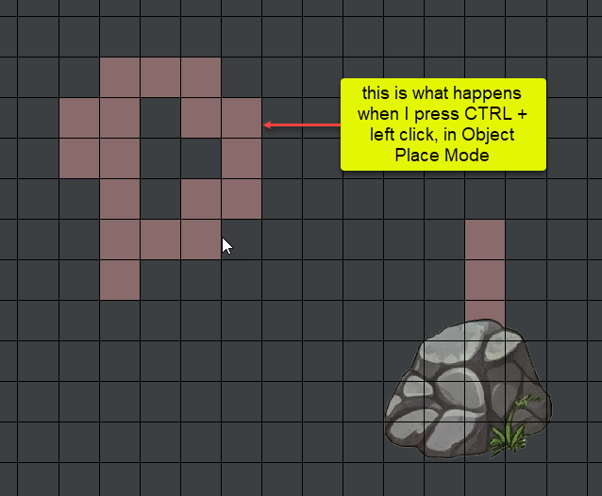
Hi!:) Okay, let 's look over the issues.
It does indeed also work in "erase mode" to move objects, but it should let you move them in "Place object mode" too, in the exact same way, just drag the top-left tile of the object around the map and you should be able to move it too. But keep in mind that you need to be in "object" mode to move objects and in "NPC" mode to move NPCs.
The other thing, it is definetly "Place NPC Walk Area Mode". Are you sure you did not hit "W" button by mistake ? That opens that mode where you can set a path for NPCs to walk if you need that kind of implementation in your game. ( I added it because I actually use that for my game). For me it does not work -Pressing CTRL + left click in "Place object mode"- and that s why i think it s W pressed and opened "Place NPC Walk Area Mode" maybe.
But i would like to hear more, if this was not the case and it is indeed a bug on my end. I want to reproduce it to debug the issue and fix it.
Second issue: after I select a ground cover and I run „Fill Entire Map” or „Fill Empty Tiles” nothing happens, although there is a message saying „Map Filled...”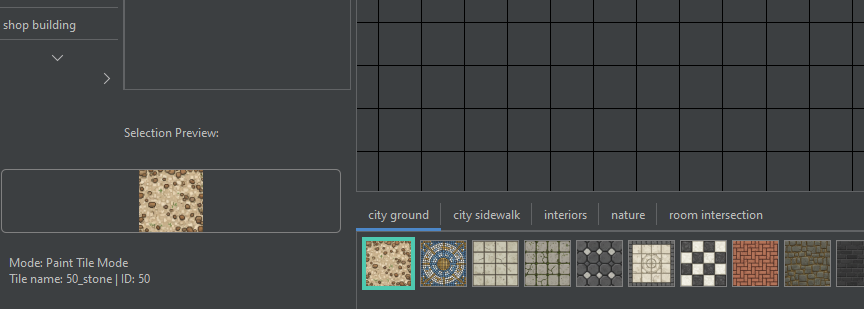
This is indeed strange, because in my case it always works. I have a question now, because I see the UI looks a little bit different. What OS are you using the tool on ? And if you have some time to chat more, maybe you can write me on reddit or facebook to learn more about this issue
I am using Windows 10 Pro. Probably the most convenient way of connecting would be Discord. Here's my id: aeon3000. Alternatively, my reddit id is ContestLonely7524.
Cu facebook-ul e mai complicat :D
P.S. Vad ca mi-a dat cineva add pe Discord, Kocolino. Tu esti ?
Yes, thanks for having a call on Discord with me to clarify those things!:D
The conclusion was that the problems happened because of the "tile size" set, they have to match the size of the tile used (by default the textures TikeMaker DOT comes with are 200x200 px, so "tile size" should be 200 until the users switch the textures with their own)
It was nice talking to you, and good luck with your game in RPG Maker!:D
Great product, is there any chance this could be ported to Android, it would work great on tablets.
Thanks a lot, i m glad you enjoy it!:D To be honest, the thought of porting it to Android crossed my mind at some point, but it's not as easy as I had hoped initially. I am not saying no at this point, but it's not as easy as I had hoped. But I am glad you enjoy TileMaker DOT and I hope it will serve you well and you will make many great games with it <3
Its awesome!!
Thanks a lot!:) It means a lot to me. If you liked it, please don't forget to rate it!
Can i use this with construct 3 😥🙏
Hi there! :)
I just checked to see how Construct 3 works and how it can import maps and it seems that it supports native .tmx/.tsx format import and that is good because in theory the answer would be yes, you could import maps from TileMaker DOT inside Construct 3.
But there is a problem, apparently Construct 3 only lets you import a single texture (spreadsheet) to use for your entire map.. and that is a problem because in TileMaker DOT, how it works is that you have a separate texture (png) for every object in the map, and that means that Construct 3 should be able to read all those separate textures and apparently it does not let you do that, unlike Unity and Godot for example. In this case, it seems to be a limitation of Construct 3:(
But maybe there are multiple versions of Construct and i just did not check the right one (i tried with the online launcher), I suggest you to try and export in tmx/tsx format from TileMaker DOT (from the File menu) and see if you can load that output inside your project in Construct 3, hopefully I am wrong and it can actually import multiple asset images.
I am having an issue when trying to launch on Debian:
Failed to execute child process “/home/user/Downloads/TileMakerDOT_Linux/TileMakerDOT_Linux_Launcher.sh”: Failed to execve: No such file or directoryHi! :D
I just saw your comment, I tested it on some Linux versions via VM and it worked for me but.. I think I know what the problem is. My personal PC is on windows and I created the TileMakerDOT_Linux_Launcher.sh file on windows and I see it 's using CR LF type endings (so basically it ends lines with /r/n) and probably Debian is using LF endings (just /n).
So when Debian reads the very first line (
#!/bin/bash), it sees the invisible Windows character and reads it as#!/bin/bash\r. Because a program namedbash\rdoesn't exist on their computer, Debian panics and throws a misleadingNo such file or directoryerror.In conclusion, I just edited the .sh file and changed what I explained above and it should work now, hopefully.. please give it a try :D
I see! I understand nothing of programming but i do get the general explanation hehe :)
Imma try it out later today or tomorrow!!!
Thanks for the fix!
Hey everyone:)
Just wanted to drop a quick note here to let you know about the latest update I just pushed. I’ve decided to make TileMaker DOT 100% free for everyone to use. My goal is to help other indie devs get their projects moving, so I wanted to remove any barriers and just give you the full toolset.
In this update, I've added a Dark Mode and a much cleaner Modern UI to make the workflow smoother. I also spent some time squashing bugs to make sure everything runs a bit more solid.
You can grab the full update now in the download section. If you’re finding the tool useful, please consider leaving a rating, it’s a huge help for the project's visibility!
If you run into any issues or have ideas for features you'd like to see next, feel free to reply here.
Happy building!
Hey - I am running into an issue with TileMaker. Is there anyway to export a tileset either as .JSON and/or .TSX with the tileset embedded?
I am trying to import at test map made in TileMaker DOT to Unreal 5.7.3 using the tiled integration plugin and the tiles are not showing up.
Hey! Thanks for leaving a comment here!
Currently, TileMaker DOT exports maps using external tileset references to keep files organized. For the Unreal integration plugin, you usually just need to ensure your
assetsfolder is in the same relative location as your exported files.Edited note*:
Sorry, if the plugin works with Tiled, then it should work with this tool. Try this before everything else: When starting the app, leave only "assets" in the base path. And after you finish your project, make sure you copy thee assets folder where you will paste your tmx and tsx files in Unity. In this way you make sure it's a relative path to the folder.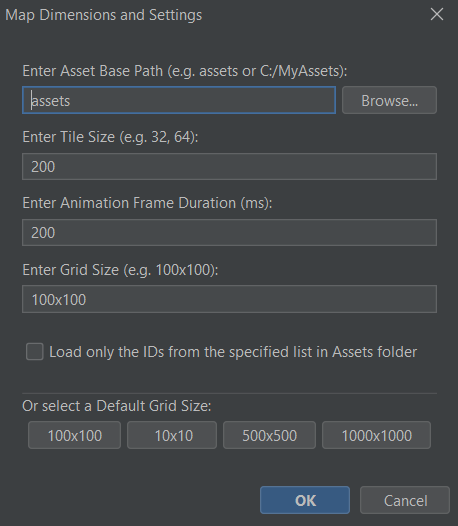
I also mentioned this in the README file:
~~~~~~~~~~~~~~~~~~~~~~~~~~~~~~~~~~~~~~~~~~~~~~~
> **⚠️ Important Path Note:** The path you enter or browse for in the **"Asset Base Path"** field at startup determines your export behavior:
> * **Relative Path:** If you keep it as `assets` (or a relative subfolder), the exported `.tmx` and `.tsx` files will use relative paths. This is recommended for moving projects between different computers or sharing with a team.
> * **Absolute Path:** If you use the "Browse" button to select a full path (e.g., `C:\Users\Name\Desktop\assets`), the exported files will hardcode that absolute path.
~~~~~~~~~~~~~~~~~~~~~~~~~~~~~~~~~~~~~~~~~~~~~~~
Please make sure to read the README, you will find useful tips there:)
And if this does not work, then try the following:
There could be a quick fix for this: Open the exported
.tmxin the Tiled Editor.But if it is important to you and if I understand how it works, I will be looking into adding a 'Direct Embed' toggle for future updates to make the Unreal pipeline possible.
Thanks for the feedback! And I am waiting for your reply
Love seeing devs build tools for other devs. Well done 💪
Thank you so much! That really means a lot. My goal is to make the tedious parts of level design a bit more fun for everyone, so I’m glad the mission resonates with you. As long as I know that my tool is used by other people in their personal or professional projects, I would call this a success on my end.
I truly believe we build better games when we share better tools. If you ever have ideas on how I can make TileMaker DOT even more useful for your workflow, please let me know!
Good luck with your projects! 💪
Hey! Is possible to import png spritesheet files to the editor and use newly loaded images?
Hey there! Currently you can import only individual textures. I did this because in this way you can make sure to define your own unique IDs for every texture and you will not be conditioned by the randomizig IDs set in a spritesheet for each tile.
I decided to do it this way because it was the easiest to work with in the end product for me and maybe for other people too. At my end I import each object individually having unique IDs.
To be honest here, I had plans to think of a way to import .png spritesheets while also defining IDs for them, but I have a few other more important features in mind like duplicating chunks of map / exporting and importing them on other maps, automatic defining IDs for all the undefined textures in the assets folders and so on. But I will take your question into consideration and when I will have some time I will think about it:)
Thank you for your question and feel free to comment at any time:) I will reply
Thanks! It would be nice to have in future, since some sprites come in separate files but some in one big png.
You gave me something to think about and I tried some things out.
I will show you a sneak peak ;)
I can promise that I am working on something and it will look like this;
You will be able to load a spritesheet, select a folder to save the textures, and then select the items you want from the spritesheet. The new name and ID will be defined automatically but a popup will let you modify them if you want to, if not just press "ok" or "continue". And then you will be refreshing the assets (I am working on this right now). And you should be ready to go in a few seconds.
But I have some other things in my agenda before this, so please stay tuned :D You will get this improvement in the near future, after 2 or 3 more updates before this.
Thank you for the suggestions and I hope you find my tool useful to you!
Hello, I forgot to reply to this thread with the new update when I added it, but now you can use this spread sheet functionality in the free version too and you can import your own textures from a single spread sheet image!:D